


Anti Blue Light Gaming Glasses for Night Comfort
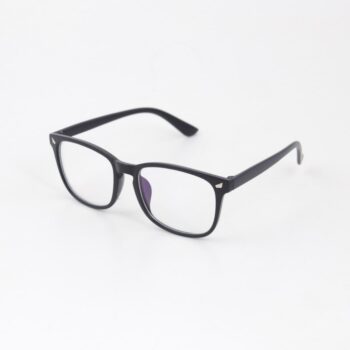
Anti-Blue Light Gaming Glasses for Comfortable Night Sessions
Long screen sessions can leave eyes feeling tired, dry, and tense—especially under bright LEDs and late-night play. Anti-blue light gaming glasses are designed to filter a portion of high-energy visible light and reduce glare, helping support visual comfort and focus during extended gaming, streaming, and study sessions.
What Anti-Blue Light Gaming Glasses Are
Anti-blue light gaming glasses are indoor, screen-focused eyewear built to make long sessions feel easier on your eyes—without darkening your view like sunglasses.
- Clear or lightly tinted lenses engineered to filter some blue light from screens and LEDs
- Often include anti-reflective coating to reduce glare from monitors, phones, and room lighting
- Built for long wear: lightweight frames, balanced fit, and wider fields of view
- Not the same as sunglasses; intended for indoor screen use
When They Help Most
The biggest difference usually shows up when visual stress builds gradually—when you’re locked in, staring longer, and blinking less.
- Extended play sessions with minimal breaks where visual fatigue builds over time
- High-brightness displays, HDR highlights, and strong contrast scenes that increase perceived glare
- Multi-monitor setups where reflections and side light are more noticeable
- Late-night screen use when comfort and wind-down routines matter
- Office + gaming overlap: coding, studying, and content creation on the same day
Blue Light, Glare, and Eye Strain: What’s Actually Going On
“Eye strain” from screens is rarely caused by just one thing. Many people experience discomfort from a mix of focusing demands, dry eyes (from reduced blinking), screen distance, contrast, and brightness.
- Eye strain is commonly linked to focusing demands, reduced blinking, screen distance, and brightness—not blue light alone
- Blue light can contribute to perceived glare and visual discomfort for some users, especially with bright, cool-white screens
- Anti-reflective coatings can reduce distracting reflections and help keep vision feeling steadier
- Comfort improves most when glasses are paired with smart display settings (brightness, warmth, and contrast) and regular breaks
For practical, evidence-based screen comfort habits, see the American Academy of Ophthalmology’s overview of Computer Vision Syndrome and the National Eye Institute’s healthy vision tips. For late-night routines, Harvard Health summarizes how evening light exposure can affect sleep cues in Blue light and sleep.
Quick Comparison: Glasses vs. Built-In Screen Settings
Glasses and device settings solve slightly different problems. Night modes can warm the screen, but they don’t stop overhead reflections from bouncing into your eyes. Glasses can help across devices, but they won’t fix an over-bright monitor or a pitch-dark room.
Ways to Improve Screen Comfort
| Option | Best for | Trade-offs |
|---|---|---|
| Anti-blue light gaming glasses | All-day multi-device use, glare control, comfort during long sessions | May slightly shift color perception; fit and coating quality matter |
| Night mode / warm color temperature | Late-night use and reducing harsh cool tones | Can alter colors; doesn’t reduce reflections from room lights |
| Brightness/contrast tuning | Preventing “too bright” or “washed out” visuals | Needs per-game/per-app tweaking |
| Room lighting (bias light behind monitor) | Reducing perceived glare and eye fatigue in dark rooms | Requires a lamp/LED strip setup |
| 20-20-20 breaks + blinking | General eye comfort and dryness reduction | Requires habit and reminders |
Fit and Comfort Checklist for Gamers
Even premium lenses can feel “off” if the frame fights your headset or shifts every time you move. A stable, pressure-free fit is what keeps glasses wearable for hours.
- Frame width: lenses should cover the full field of view without forcing a head tilt
- Nose support: stable without pressure points during long wear
- Temple arms: secure fit under headsets; avoid painful pinch near ears
- Lens clarity: minimal distortion at edges to prevent headaches
- Coating quality: anti-reflective finish to cut reflections from overhead lights and monitors
If you wear a headset, put your glasses on first, then settle the headset so the ear cushions don’t crush the arms into the side of your head. Small adjustments in headset height often make a big difference.
A Simple Setup for Late-Night Play
Glasses work best as part of a whole setup. Think of comfort as the combined effect of lens coating, display settings, and your room lighting.
- Lower brightness until white screens feel comfortable rather than “glowing”
- Use a warmer color temperature after sunset to reduce harsh cool tones
- Add soft ambient light behind or beside the monitor to avoid playing in a pitch-dark room
- Position the monitor so overhead lights don’t reflect directly into the lenses
- Take quick micro-breaks between matches to relax focus and rehydrate eyes
For an easy desk-side upgrade to comfort, consider adding gentle moisture to dry rooms—especially in winter or with constant A/C—using the Mini USB Aroma Humidifier & Essential Oil Diffuser with Soft LED Light.
Featured Option: Anti-Blue Light Gaming Glasses
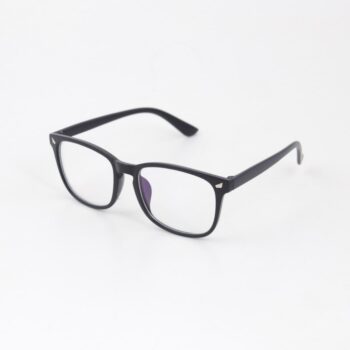
Shop the Anti-Blue Light Gaming Glasses for a comfortable, screen-ready option that’s easy to keep at your desk or in your backpack.
Care Tips to Keep Lenses Clear
FAQ
Do anti-blue light gaming glasses stop eye strain?
Eye strain is usually caused by a combination of factors like prolonged focusing, reduced blinking, screen brightness, and glare. Anti-blue light gaming glasses can improve comfort by filtering some blue light and reducing reflections, but the best results typically come from pairing them with good lighting, sensible brightness settings, and regular breaks.
Will these glasses change how games look?
They can cause a slight warm tint or subtle color shift depending on the lens. For comfort-focused sessions they’re great, but for tasks that require exact color accuracy, removing them may be preferable.
Can they help with sleep if gaming at night?
Reducing bright, blue-heavy light in the evening may help some people wind down more easily. Pair glasses with dimmer, warmer display settings and a consistent bedtime routine for better late-night habits.










Leave a comment